No time to read a long guide? Here are 17 quick tips. Each takes a few seconds.
Where to put it
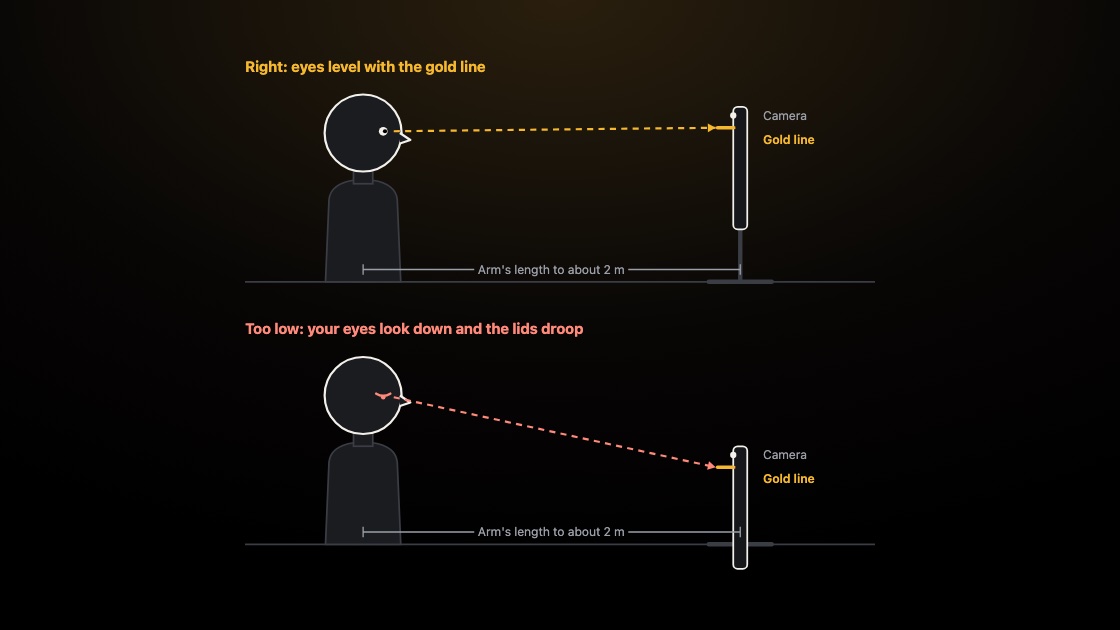
- Sit a short way back. Start at arm's length for an iPhone and 1 to 2 m for an iPad. Move back until your eyes stop moving.
- Raise the prompter to eye level. If you look down, your eyelids drop and your eyes look half closed. Lift the device.
- Put the camera near the read line. The nearer the lens is to where you look, the more you seem to look at the viewer.
- Look at the gold line. It marks where to read. Set it level with your eyes.
- Move the read line up. In Display, the Read line row sets how far down the screen you read. Try a higher spot, near the camera.
Why these matter: see where to put your teleprompter.
Set up the text
- Go bigger on text size. Tap the larger A on the dock until the words are easy to read from where you sit.
- Raise the side margins. Shorter lines mean your eyes move down more than across. Find Side margins in Display.
- Slow down with −. Tap − on the dock for a calmer scroll. Tap + if you are waiting for words.
- Drag to scroll. Drag the text with your finger to jump to any spot in your script.
- Use # for section headings. Start a line with # to make a heading, then hop between sections from the dock.
Mark up your script
- Add cue marks. Use [PAUSE], [SLOW], [EM] and [/EM] around a word, or ==highlight== a phrase, so the prompter reminds you.
- Look up at the green eye. When it appears, look into the lens and finish the thought to one person.
Rehearse
- Record a take and watch it back. Use the front camera, then check for eyes darting and drooping lids. Your first three takes are free.
- Read it out loud first. Rehearse at full voice. Reading silently only feels like practice.
Deliver it
- Pause before the key line. A short wait before your most important line makes people lean in.
- Smile before you start. Smile before the first word. Listeners can hear it.
- Breathe at the slashes. Add a slash where you want a quick breath, and breathe there every time.