Where you put the prompter changes how you look on camera more than most settings do. Get the distance and the height right and your eyes stay calm, level and on the lens.
How far away to put it
Distance is a trade-off. Close to the screen, the text can stay small, but your eyes sweep from side to side across every line and the camera sees it. Further away, your eyes barely move, but the words must be bigger to stay readable.
Start here, then adjust:
- iPhone on a tripod: about arm's length, perhaps up to 1 m. The screen is small, so use big text and a narrow column.
- iPad on a stand: roughly 1 to 2 m, depending on your text size.
- iPad or iPhone in a glass rig: the same idea. Sit far enough back that the reflected text is comfortable, and turn on Mirror in Display if the words appear flipped.
The right distance is the furthest one where you can still read without leaning in or squinting.
Why height matters more than you think
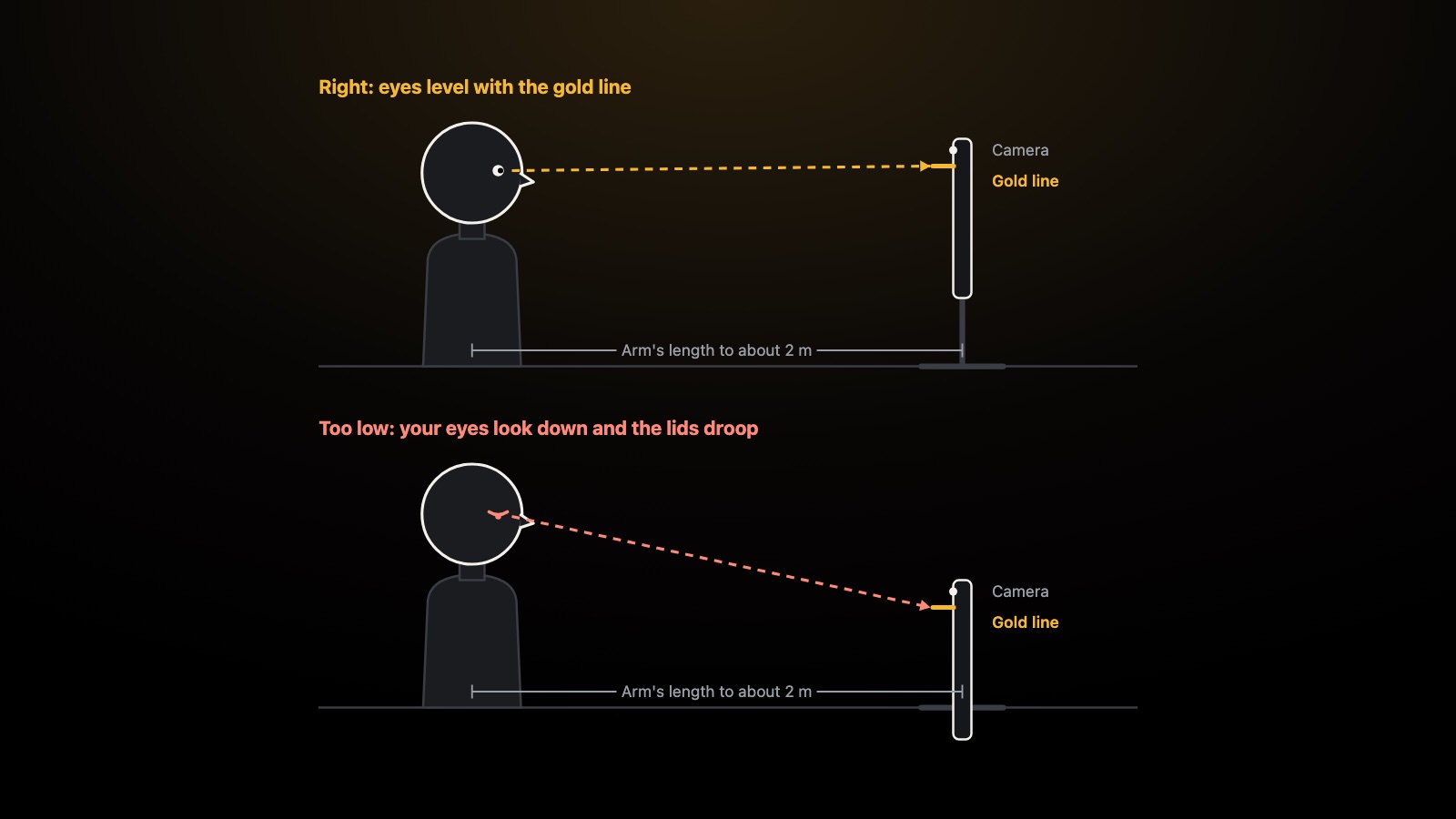
If the prompter sits below your eyes, you look down to read. Your face may point straight at the camera, but your upper eyelids drop as your eyes go down. On video you look tired, or half asleep. Viewers feel it without knowing why.
The fix is height. Set the device so the line you are reading sits level with your eyes, and the camera lens sits at eye level or just above. Then you look straight ahead, your eyes stay open, and the camera sees you looking at the viewer.
Use the gold line as your guide
The gold read line in TeleprompterThis marks where to look. You can move it. In Display, the Read line row sets how far down the screen the line sits, and a lower percentage puts it higher. Place it near the top of the screen, close to the camera, and raise the device until that line is at your eye height.
When you record, the app uses the front camera, so the lens sits at the edge of the same screen. A read line near the camera means a shorter look, and less of one.
Stop your eyes darting
If your eyes flick from side to side as you read, the words are usually too small or the lines too long.
- Make the text larger. Tap Text size in Display, or the larger A on the dock, until you can read without leaning in.
- Narrow the column. Raise Side margins so each line is short. Your eyes then travel down more than across.
- Slow the speed. Tap − on the dock for a calmer scroll. Hurrying makes your eyes chase the text.
- Step back if you can. More distance with bigger text gives your eyes less to do.
To keep these settings for every script, set them once under Settings, Default look.
Set it up and test it
- Place the device on the tripod or stand at your starting distance.
- Sit or stand how you will during the take.
- Raise or lower the device until the gold line is level with your eyes.
- Check that the camera lens is at eye level or just above.
- Adjust Text size and Side margins until the words are easy to read.
- Record a short take with the front camera. Your first three takes are free.
- Watch it back with the sound off. Look for eyes darting and eyelids drooping.
- Move the device a little, change one setting, and record again.
It takes two or three tries. Change one thing at a time, so you know what helped.
Small things that help
- Keep your head level and your chin neutral. Raising the device beats tipping your head back.
- Put a book or a box under a table-top stand if you can't raise it any other way.
- Keep the light in front of you, so your eyes are visible.
For more on delivery once the setup is right, read how to read a teleprompter without sounding robotic. In a hurry? Here are 17 quick teleprompter tips.
Frequently asked questions
How far away should a teleprompter be?
Start at about arm's length for an iPhone and 1 to 2 metres for an iPad, then adjust. Move back until your eyes barely move as you read, and enlarge the text until you can still read it comfortably.
How high should a teleprompter be?
High enough that the line you are reading sits level with your eyes, with the camera lens at or just above eye level. If you have to look down, the prompter is too low.
Why do my eyes look half closed on camera when I read?
Usually because the prompter sits below your eyes. Looking down lowers your upper eyelids, even when your face points straight at the camera. Raise the prompter, or move the read line up the screen.
Does the camera on my iPhone or iPad see the same thing as my eyes?
Yes. In TeleprompterThis you record with the device's front camera, so the lens sits at the edge of the screen you are reading. The closer the read line is to that edge, the more it looks like you are looking at the viewer.