A teleprompter helps a student most when it is a way to practise, not a way to read. Used well, it gets a speech into your head faster, keeps your place when you are nervous and makes an announcement sound steady. Used badly, it makes you read to the screen. Here is how to use it well.
Check the rules first
Some classes, speech contests and debate events do not allow phones or tablets. Ask before you plan around one. The advice below still helps, because practising with a prompter makes you need it less.
A prepared speech
A speech that is written out is the easiest case. The risk is that you read it at the audience. The aim is to know it so well that the screen is a safety net.
- Write it for the ear. Short sentences, everyday words, the way you would say it to a friend. Read it aloud and change anything that makes you stumble. Our guide to writing a script for a teleprompter goes through it.
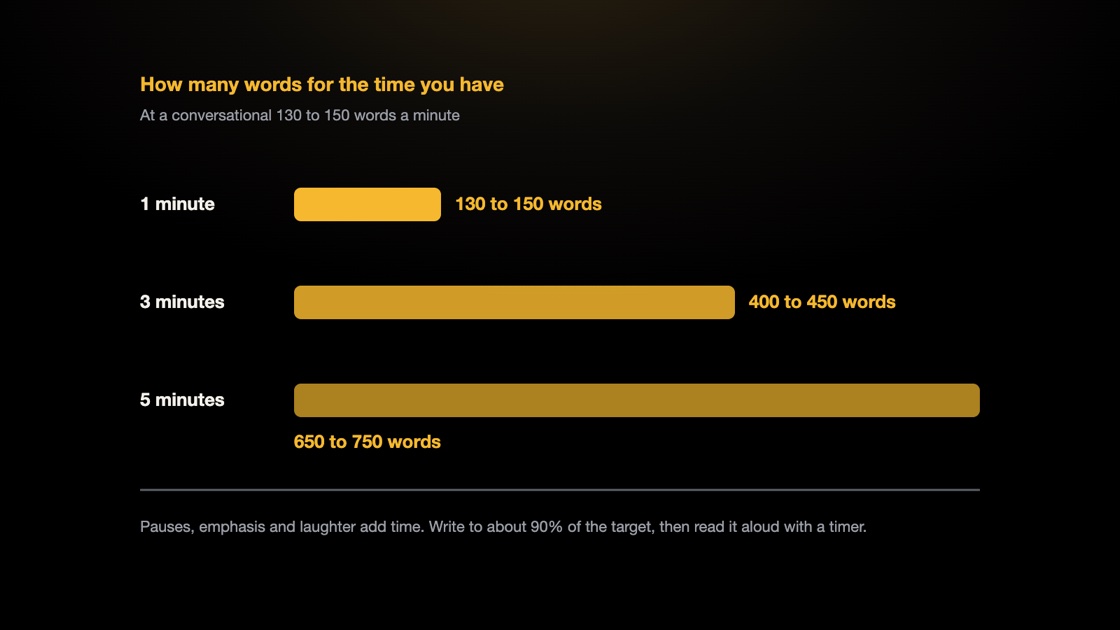
- Check the length. Most people speak at 130 to 150 words a minute, so a 3 minute speech is about 400 words. How many words for a 1, 3 or 5 minute script has the table and a way to measure your own pace.
- Mark where to pause and where to look up.
[PAUSE]after your main point,[LOOK]at the end of a key sentence. They are shown to you and never read aloud. - Rehearse three times. The first with the text as it is. The second looking up at the end of each sentence. The third with as little glancing at the screen as you can manage.
- Put in time checks for a longer speech.
[@2:00]on its own line tells you where you should be at two minutes.
If the screen is allowed on the day, set the text large and the lines short, so a glance is enough to find your place.
Debate: a safety net, not a script
In debate, reading a speech word for word is a weakness. Judges notice it. You cannot answer the other side if you are reading something you wrote before you heard them, and the audience can tell.
So treat a prompter as notes, not as a script. Where devices are allowed:
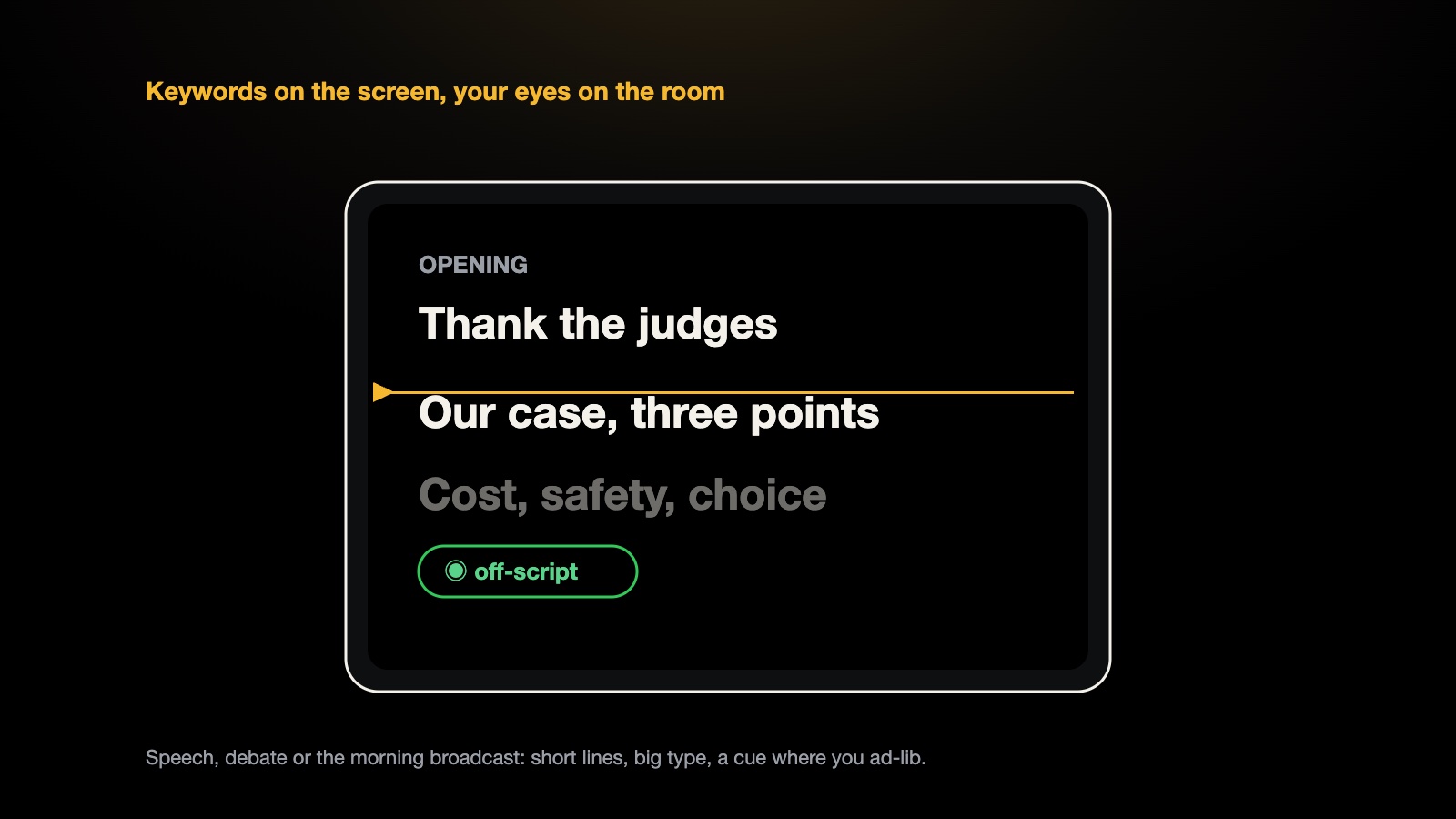
- Keep keywords, not sentences. Write the point in a few words, such as "cost to families, two figures, the school in Leeds". You choose the sentences while you speak.
- Use sections for your structure. Start a line with
# Headingfor each argument, so you can see where you are and jump to another. - Leave a gap for the rebuttal. An
[OFF-SCRIPT]cue on its own line marks the place where you will answer what was just said. The scroll stops there, and voice follow holds until it hears the first words of the next line. - Use it to practise. Rehearse the full speech with the prompter, then rehearse again with only the keywords showing. The second run is closer to the real debate.
Voice follow is part of TeleprompterThis Pro. The scroll mode, the cues and three scripts are free.
Morning announcements and school broadcasts
A school broadcast has a camera, a short script and an audience that is not in the room. An iPad on a stand in front of the camera works well as the prompter, and a phone or other camera can record. It is simple to set up:
- Keep it short. Each announcement is two or three sentences. Say what, when and where. Say the date or time twice if it matters.
- Put the text large on the iPad and stand or sit back, so your eyes barely move. The read line near the top of the screen keeps it close to the camera. See where to put your teleprompter for height and distance.
- Use a remote if two students share the job: one reads, one controls. In TeleprompterThis an iPhone paired with the iPad can start, stop and change the speed. See using an iPhone as a remote for an iPad teleprompter. The remote's live controls are part of Pro.
- Rehearse once aloud for names, dates and room numbers. Spell a hard name the way you say it.
- Smile before the first word. It carries in the voice.
A script that can be reused each day, with the date changed, can be saved and opened again.
Habits for all three
- Know your script before the prompter. The screen is for when you lose your place.
- Look up at the end of each sentence, and say the last few words to the room.
- Pause. It feels long to you and sounds confident to them.
- Read it aloud, not silently. Silent reading only feels like practice.
- For more, see how to read a teleprompter without sounding robotic.
Frequently asked questions
Can a student use a teleprompter for a speech?
Yes, for practice and where the rules allow. Rehearse with the script on screen until you know it well, then look up more and glance down less. Check your teacher's or competition's rules first, because some events do not allow devices.
Is it cheating to use a teleprompter in debate?
It depends on the event. Many debate formats do not allow electronic devices in the room, and reading a speech word for word is a weakness even where they do. Use a prompter to practise, and keep keywords rather than sentences if you may use notes.
Can I use a teleprompter for morning announcements?
Yes. An iPad on a stand in front of the camera works well for a school broadcast. Write short sentences and read them aloud first, so they sound like announcements and not a notice.
Is there a free teleprompter for students?
TeleprompterThis is free for up to three scripts, with every prompter setting and all the delivery cues. Voice follow, camera recording and the iPhone remote are part of Pro.